91 AI Tools, One Question: What Should I Try First?
People kept asking me which AI tool to use for their job, so I built a site that starts from the task and names one tool to try first.
Ask someone which AI tool to use for a presentation and you’ll get a list. Gamma, Claude, ChatGPT, whatever they opened last week. Ask five people and you get five lists that barely overlap. The person asking didn’t want a list. They wanted a starting point.
That gap is what AI Tools for Work is built around. There are plenty of AI tool directories already. They sort by category and show you everything. I wanted one that starts from the job and commits to an answer.
The code is on GitHub under MIT, if you want to see how it’s put together.
Why it exists
The question kept coming to me. Colleagues, friends, people who knew I spent my days around this stuff. Which AI tool should I use for this? Never “which model is best.” Always a job: a deck, a list of sales leads, a call recording full of background noise.
I answered every time, and every time the answer came out a little different. A different list depending on what I’d touched most recently, or on who was asking. That bothered me. If I can’t give the same answer twice, nobody has a reason to trust it once.
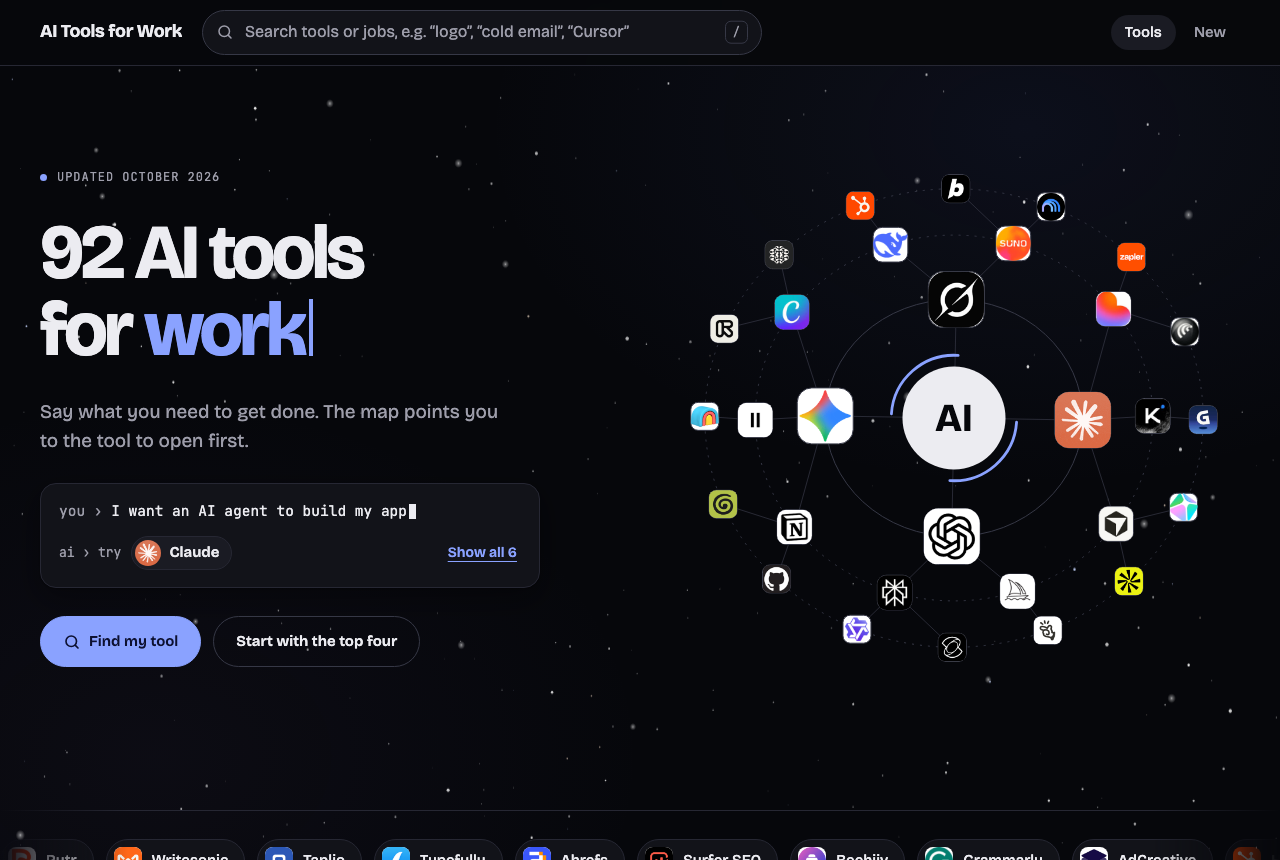
So I wrote the answers down. One pick per task, behind a link I could paste instead of retyping a message. The orbit and the night sky are there because a link people open should be pleasant to open.
Start with the job
The homepage asks for one thing: say what you need to get done. You type it, or you pick from 42 tasks. “Build a presentation.” “Find sales leads.” “Clean up call audio.” Tools come back in a recommended order, and the first one wears a “Try first” label.
That label is the whole point. A page that lists twelve video tools as equals makes the visitor do the ranking. A page that says start here, with alternatives behind it, has taken a position. A position can be wrong, which is why it’s worth having. You can disagree with it. You can’t disagree with an alphabetical list.
The homepage demonstrates this on itself. A prompt types out: “I need a short video from a text prompt.” The answer appears underneath: try Google Flow. That’s the entire experience in two lines.
The big three come first
Claude, ChatGPT, and Gemini get their own cards at the top, each linking to the desktop app, the coding agent, and the web version.
If you’ve never used AI at work, 91 options is the wrong place to begin. Pick one of the three, use it for a week, and get a feel for what it’s good at. Specialists make sense once a job gets narrow enough that a general assistant starts to feel clumsy. The “Start with the big three” button sits right next to “Find my tool” for that reason. It’s an opinion, and the site is built on opinions.
Then the specialists
Ten work areas hold the rest. Programming, Design, Video, and Productivity are the largest, at 11 or 12 tools each. Marketing, Sales, and AI Assistants have 10 each. Audio & Voice has 6, and Agents & Browsers has 5.
The names are familiar once you’ve seen them in context. Gamma for decks. HeyGen when the video needs a presenter. Apollo for sales leads. Granola and Otter for meetings and calls. Midjourney for images. Cursor when the job is writing code. Kimi among the assistants beyond the big three. Google Workspace, which a lot of people already pay for and forget is an AI tool now.
I won’t spoil which one is first for each task. That’s what the site is for, and the picks are the part that changes.
The apps you already half-know
The strip along the bottom of the homepage is where the familiar names live. Notion, ClickUp, Trello, and Zapier for the work around the work. Calendly and Motion for your calendar. NotebookLM for questions about your own documents. Grammarly, Writesonic, and Rytr for words. Ahrefs and Surfer SEO for search, HubSpot for the sales pipeline, Taplio and Typefully for social posts, Beehiiv for newsletters.
Plenty of these were around long before the current wave and added AI later. The site counts them anyway. The only test is whether it helps with the job.
Two minutes on the site
Say what you need, or pick the closest task. Open the “Try first” tool, which launches the official site in a new tab. If the job doesn’t fit, hover over the other cards to preview them before you click.
When something looks worth coming back to, star it. Stars live only in your browser, so there’s no account and nothing sent anywhere. Press / to search by tool name or description, and use the filter chips to narrow things to one work area.
People who don’t want motion can turn on Reduce Motion, and the orbit and the stars calm down. Search, filters, and stars work by keyboard.
Where I’d like to be argued with
A few calls on the site are opinions I’m not sure about.
Should a general assistant beat a specialist? Putting Claude, ChatGPT, and Gemini first is a bet that most people never outgrow them. Some people will, and sooner than I think.
Does the tool you already pay for beat a better one you’d have to learn? For the first week, I lean yes. Google Workspace or Notion that’s already open usually wins over a sharper tool that needs a signup and an afternoon. I’m less sure about the second month.
And is one “Try first” honest? Sometimes two tools are a draw. Naming one is a coin flip with a confident label on it.
If your pick is different, I’d like to hear it. The project is open on GitHub, a new tool is a single line, and moving a tool up or down a task’s list is a smaller edit than this paragraph.
The thing I think about most is the ranking. I suspect the people asking me weren’t short of options. They were short of permission to pick one and start. A “Try first” label is a small thing, but it gives them that. The cost is that I own the ranking now. A pick that’s right today may not be in a few months, and the site only stays useful if I keep reading it like a skeptic.