LoopX: A Quiet Teammate on My Mac That Works the Queue
Claude co-worker looked great until I did the seat math, so I built LoopX: a quiet teammate that works my GitLab issues, inbox and briefings, so I only spend attention on what needs my judgment.
I had Claude’s co-worker pitch open in one tab and our team’s GitLab issue backlog open in the other. The pitch was exactly what I wanted: something that works the queue every morning, fixes what it can, flags what it can’t, so nothing assigned to anyone just sits there untouched. I’d already seen Claude Tag do something close to this in Slack, and it’s genuinely good. Then I did the seat math against how much GitLab traffic we actually generate, and it didn’t pencil out next to the Claude Code subscriptions already running on every machine on the team.
That stuck with me. The capability I wanted wasn’t exotic: list my assigned issues, work them one at a time, fix what’s fixable, comment on what isn’t, send me a digest. claude -p can already do every step of that from a terminal. What I’d be paying extra for was the scheduling, the safety rails, and the dashboard around it. So I built that layer myself, on top of CLI access I was already paying for.
The first version was a pile of Python scripts and a loops.json. It worked, and then it kept growing. It’s now LoopX, a Mac app with a Rust core, a dashboard, six loops running on my machine, and a 3D office.
What LoopX is
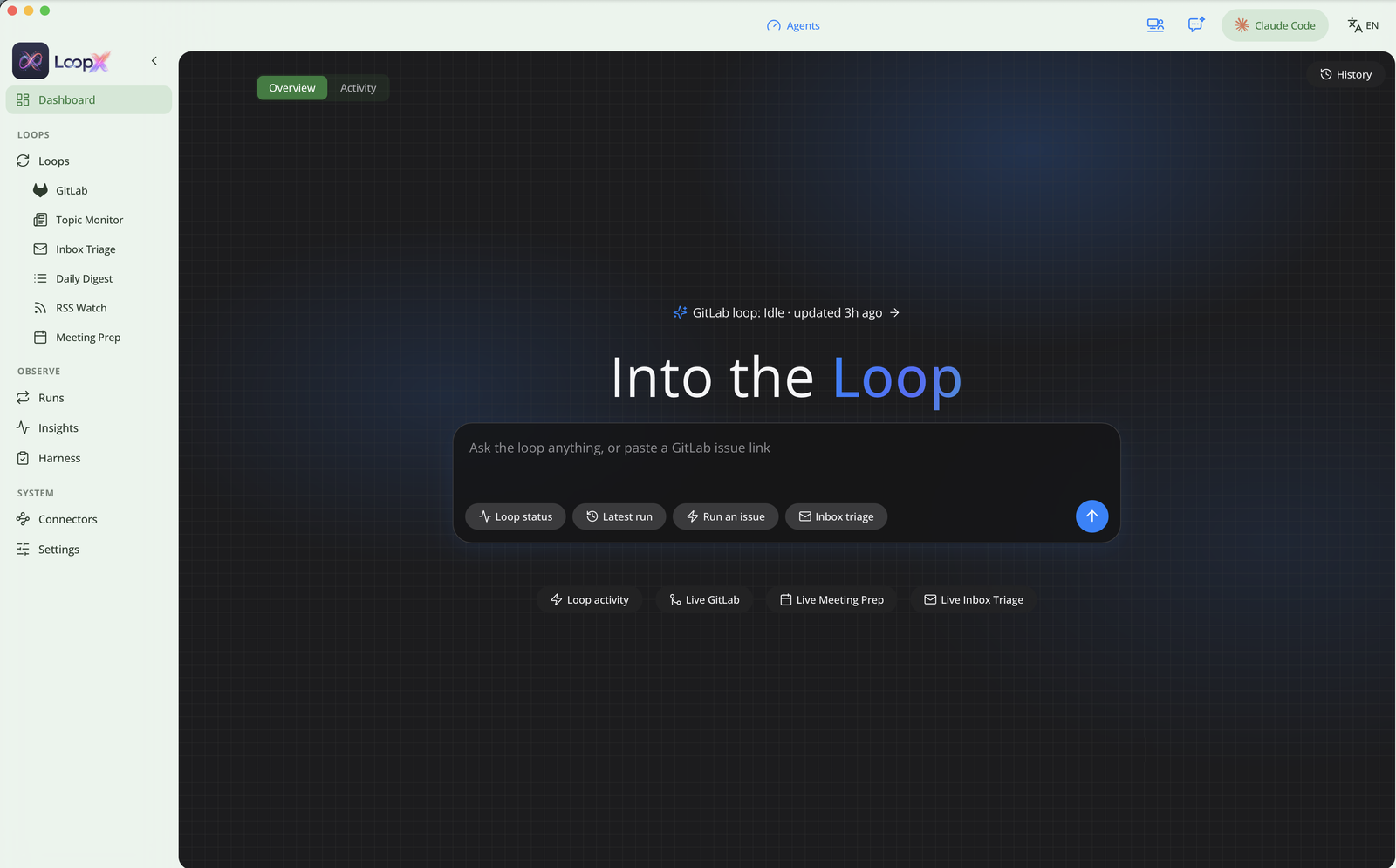
LoopX is a local-first orchestration layer for AI agents. A loop is one workflow with its own task spec, schedule and run history. The agent that does the thinking is whichever coding CLI you point it at: Claude Code by default, or Codex, Gemini, Kimi or Cursor, chosen in Settings. LoopX decides when a loop runs, runs it, and carries it from “found a task” to a result a human can review.
Everything stays on the Mac. Tokens live in the Keychain, the scheduler runs as a background daemon, and nothing is hosted for me. Install is a curl script, a Homebrew formula, or a DMG you drag into Applications, and loopx doctor tells you what’s missing before you trust it with a schedule.
The loops
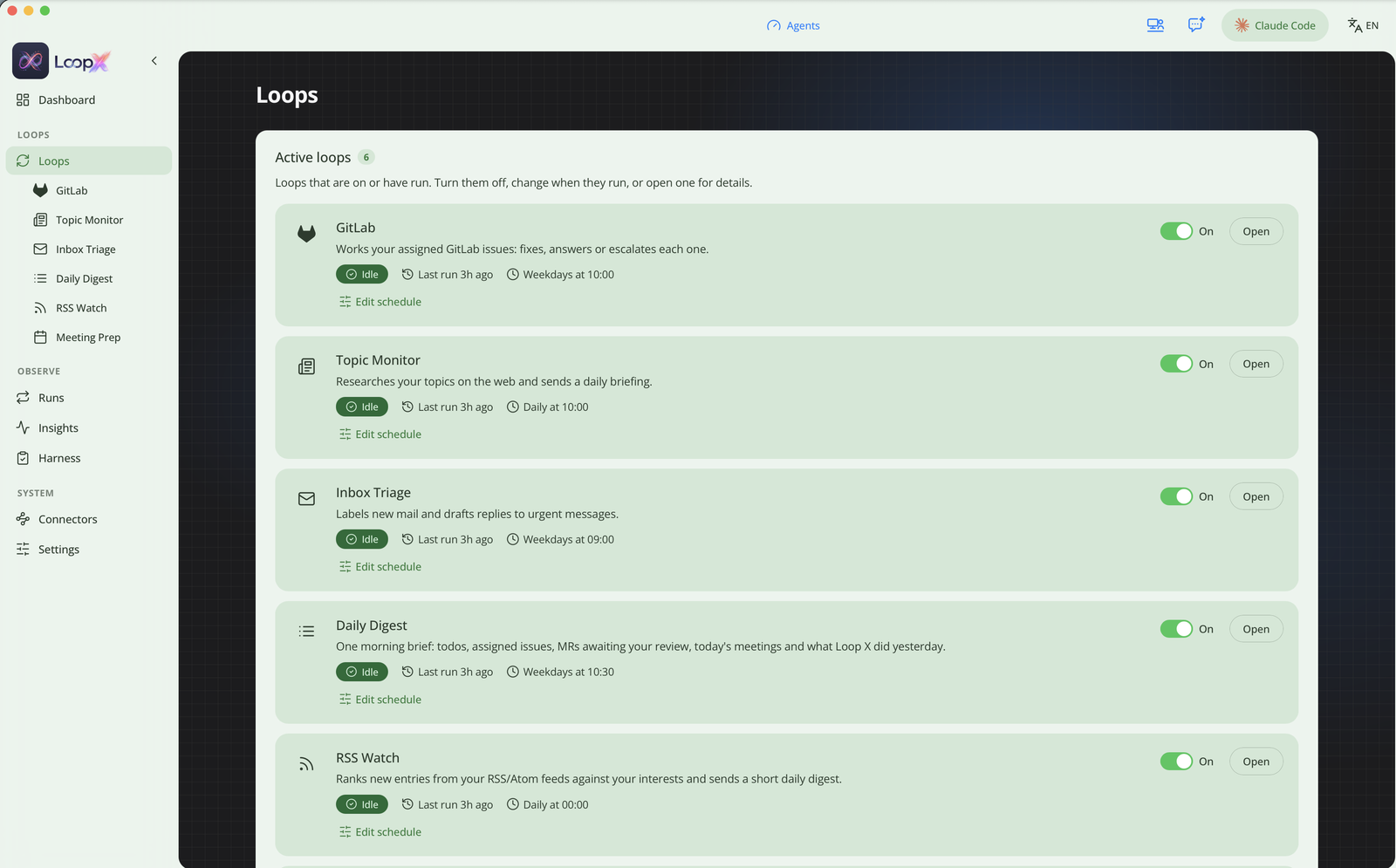
The flagship is still GitLab issues. Every weekday at 10am it lists what’s assigned to me across the projects I’ve listed and works through them one at a time, never in parallel. That took some getting used to, since the instinct with agent work is “why not fan these out.” For each issue it does one of three things. It fixes the issue on its own loop/issue-<iid> branch in an isolated worktree and opens a merge request only if the project’s own lint and tests pass. Or it answers with a comment when no code change is needed. Or it asks me a question, with a loop:needs-human label, when the ask is unclear.
The rest grew out of the same shape of problem. Inbox triage labels new mail and drafts replies to the urgent ones, and it never sends. The topic monitor researches topics I describe in a sentence and sends a daily briefing. On a quiet day it still posts “nothing new”, because a loop that goes silent looks exactly like a broken one.
The daily digest is my morning brief: todos, assigned issues, merge requests waiting on my review, today’s meetings, and what LoopX did yesterday. RSS watch ranks new entries against my interests, so the unread count stops climbing toward four digits. Meeting prep builds a brief before each meeting from the agenda, linked work and recent mail with the attendees. For recurring meetings it adds whatever was left open last time.
There are more behind switches I haven’t flipped: an MR pre-reviewer that leaves drafts, a pipeline doctor for failed CI, a weekly stale-work sweeper, release notes written from the merge requests since the last tag, and a LinkedIn autopilot. Only GitLab and the topic monitor are on by default. The README says to turn on one more at a time and watch the Runs page before adding the next. I agree.
Everything is also a command
The dashboard is for looking. The loopx binary is for checking, and it’s the same Rust binary the Mac app talks to, so the terminal and the UI read the same state.
loopx doctor                 # first-launch checks, including the scheduler tick
loopx scheduler status       # last tick, what's queued or running, each loop's next due time
loopx loops                  # the registry: name, schedule, entry point
loopx ai-cli                 # which CLI every loop invokes (claude, codex, gemini, kimi, cursor)
loopx issues list            # open GitLab issues assigned to you, across tracked projects
loopx run gitlab-loop        # run one loop now
loopx run gitlab-loop <alias> <iid>   # work a single issue
loopx serve                  # the dashboard backend
loopx scheduler status --json exits 1 when something is wrong, so it drops straight into a cron check or a shell prompt. A tick that hasn’t written its heartbeat in three minutes counts as stalled. That one command answers “is it actually running” without opening anything.
Underneath the loops there’s a second group for the audit trail: loopx ledger, loopx events, loopx metrics, loopx cost and loopx risk read the append-only event log, and loopx loop eval --golden replays synthetic issues against the real agent before and after I touch a prompt. State lives under ~/.loopx, plain files you can read.
Unattended, one at a time
Every loop is triggered by the scheduler. A tick every minute queues whichever loops are due, and a worker runs that queue one at a time, so loops don’t compete for the same machine or the same repo. Nothing waits for me to press a button, which is why the limits matter as much as the tasks.
LoopX never merges. It stops at an open merge request and merging stays a human click. It never sends email and never deletes or moves any. It only touches projects I list. A failed verification escalates instead of retrying forever.
The decision I’d defend hardest is about tests. The agent works out each project’s install, lint and test commands itself and logs them under the issue. Then the loop re-runs them in gate mode, and the merge request opens only if that re-run passes. When the model says the tests pass, that’s a statement to check, so the loop checks it.
The other split that mattered was cost. Fixing code needs a shell, worktrees and the project’s test suite. Summarizing a feed or a calendar needs one model call over data already fetched. Keeping those two kinds of loop apart did more for cost than prompt tweaks did, since most of my daily volume is the second kind.
Then I added an office
The office is the one part nobody asked for. It’s a 3D scene built with three.js, and each loop is a colleague at a desk. I added it for a plain reason: I stare at dashboards, terminals and diffs all day, and I wanted one screen that was easy on the eyes and a little fun.

When a loop runs, its colleague is at work. When I ask the chat to do something, the employee for that tool walks to their desk, and a failed tool call shows in amber. Idle colleagues stroll around, wander to the coffee shop or the bookstore next door, and the street outside has cars and pedestrians. The light follows the time of day. Ctrl+V flips between the Office and the Dashboard.
It does a small practical job too. A glance at a room where someone is typing tells me the agent is working, faster than a status pill does. The dashboard is still where I go for anything that matters, and the office is why I leave the app open.
What changed
I went in thinking I was shopping for “an AI that works your issues.” The model call was never the scarce part. I already had it, included in a subscription I paid for regardless. What the hosted products sell is the orchestration around that call: the schedule, the boundaries, the visibility, the policy on what an unattended agent may touch. That’s a real product and a fair one to charge for, but every piece of it is a decision I could make myself.
What changed most is how I work. A new issue shows up, whoever filed it, and LoopX picks it up on its own: it analyzes the problem, decides whether it needs code, and if it does, starts the fix without being asked. I don’t kick anything off. I open the result and decide whether it matches what I expected. My job moved from doing the first pass to judging the last one, and that’s a different kind of day.
The other surprise is how little of the codebase is the task itself. A loop that fixes an issue or writes a brief is mostly a task spec handed to an agent. The ledger of every run, the budget caps, the verifier, the escalation rules and the list of things it can never do are most of the project, and that held for every loop I added. If I started over I’d write the boundaries first. LoopX is MIT licensed at github.com/encoreshao/loop-x.